In this article, I will tell you how to create a Shopify Store. Hi! My name is Jack Baylen, and I’ve been working on Fiverr as a Shopify expert for the past 4–5 years.
During this time, I’ve helped hundreds of clients with Shopify store creation, store design, product listing, product hunting, SEO, and all-important pages setup.
In this complete guide, I’ll share my real experience — not theory — so you can create a Shopify store from scratch and start your own online business. If you read this full article and follow each step carefully, I promise you’ll be able to build your first Shopify store by yourself.
What Is Shopify and Why Choose It?
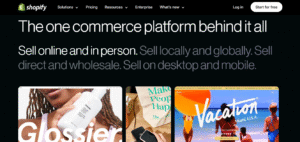
Shopify is one of the world’s best e-commerce platforms, allowing anyone to sell digital or physical products online.
The best part? You don’t need an office, warehouse, or big investment. All you need is a laptop and an internet connection.
Shopify makes online business simple. Whether you want to start dropshipping, sell your own handmade products, or build a professional brand store, Shopify gives you everything — hosting, themes, payment methods, and apps — in one place.
Step 1: Create Your Shopify Account
Let’s learn how to create a Shopify store step-by-step.
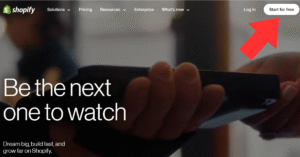
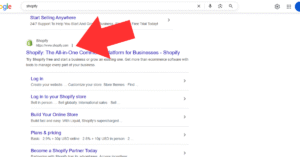
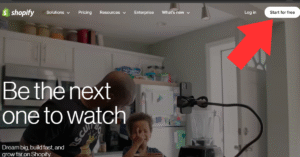
First, you need a personal Gmail account for this. Then you go to Google and search shopify.com and click on shopify original website. Then, on the right side, at the top, you’ll see “Start a free trial” and click on it.
Remember, shopify allows a 3-day free trial when you sign up first time. And then shopify offers you a 3-month plan for just $1. When you click on Start a free trial then you reach a new next step.
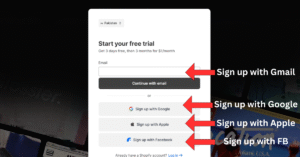
In this step, shopify gives you multiple options for signing up. like sign up with Gmail, sign up with Google, and sign up with Facebook.
Now it’s your choice how you sign up for your shopify account. But my recommendation is that you sign up with Gmail.
After signing up with Gmail. shopify asks you a few questions, like. You have your own products, r you do dropshipping, and some other questions like that. These questions are not important. You just tick one of them and go next and next.
When you complete this process then you reach on shopify dashboard, and it means that your shopify store is created.
- Prepare your Gmail account.
You’ll need a personal Gmail to sign up.
-
Go to Shopify.com
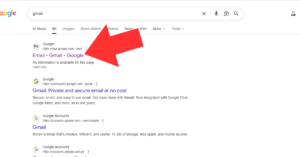
Open Google, type “Shopify,” and click the official website.
-
Click on “Start free trial.”
Shopify currently offers a 3-month plan for just $1, perfect for beginners. (If you’re seeing a $5 offer instead, don’t worry — Shopify keeps changing its promotions.)
-
Sign up using Gmail, Google, or Facebook.
Choose one option and proceed.
-
Answer a few questions.
Shopify will ask whether you already have products, if you’re planning dropshipping, or if you’re creating a new store. Choose whatever fits your situation — it’s just to personalize your dashboard.
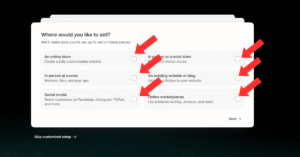
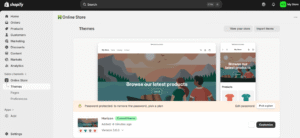
After that, Shopify automatically creates your new store. Within a minute, you’ll land on your Shopify dashboard.
If you ever get confused, you can also hire someone to build your Shopify store professionally. Many Shopify Partners (like me) on Fiverr provide full setup services at affordable rates.
Step 2: Understand the Shopify Dashboard
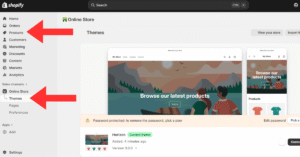
Once your account is created, explore the dashboard. You’ll see menus like:
-
Online Store → Themes (for design)
-
Products → Add Product (for listings)
-
Settings → Domains, Payments, Shipping, Taxes, etc.
Don’t worry if it feels overwhelming. You’ll learn each section as we move through this Shopify learning series.
Step 3: Choose a Shopify Store Creation Template
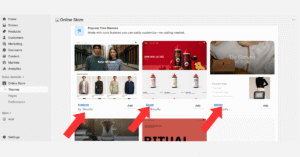
Shopify offers hundreds of free and paid templates (themes). Choose one that matches your business type — fashion, beauty, home décor, tech, or anything else.
If you want to start with something free, try “Dawn” — Shopify’s most popular and flexible free theme. You can later upgrade to a premium one from the Shopify Theme Store or Shopify App Store to unlock extra features.
You can also use the Shopify store builder AI (an exciting new feature) that automatically creates layouts and product sections for you.
Shopify Login and Management
After setup, you can always access your store at shopify.com/login.
From the dashboard, you can manage products, check orders, install apps, and view analytics.
Tips from My 5-Year Experience
-
Keep your store design clean and mobile-friendly.
-
Add at least five high-quality product images per item.
-
Use SEO keywords naturally — like create Shopify store, Shopify store creation free, and how to create a Shopify store for beginners.
-
Avoid overusing keywords; focus on helpful content and clarity.
-
If you want fast results, consider hiring a Shopify Partner for setup and optimization.
Conclusion
That’s the complete beginner-friendly guide on how to create a Shopify store.
If you follow these steps carefully, you’ll be able to build your own online store — no coding, no technical stress.
This article is the first part of my Shopify course series. In the Next part, I’ll teach you:
-
How to create Shopify pages
-
How to connect your domain
-
How to add products that sell
-
And how to start earning organically from Shopify
If you have any questions, just drop a comment below — I’ll personally reply to every message.
And remember, if you ever need professional help creating your Shopify store, you can hire someone on Fiverr or contact me directly as a Shopify Partner.
More Details: Click My Fiver Account is Here
Keep visiting this site for real, working, and 100% organic online-earning methods.
Follow this course step-by-step — and soon you’ll become a Shopify expert yourself!
FAQ
Q: How to start a Shopify store for beginners?
A: Sign up for Shopify, choose a free trial, pick a template, add products, and publish your store. No coding required!
Q: How to create a new store on Shopify?
A: From your Shopify dashboard, click your profile → “Create another store.” You can run multiple Shopify stores under one account.
Q: Why is Shopify asking for $5000?
A: That’s for the Shopify Plus Plan, designed for large enterprises — not needed for beginners.
Q: How to get 3 months for $1 on Shopify?
A: Shopify often runs this promotion. Just sign up through their homepage when the offer is live.
Q: Is making a Shopify store free?
A: You can start free with a trial, but to keep your store live, you’ll need a paid plan after the trial period.
